<?xml version="1.0" encoding="utf-8"?><feed xmlns="http://www.w3.org/2005/Atom" xml:lang="en"><generator uri="https://jekyllrb.com/" version="3.10.0">Jekyll</generator><link href="https://dadams.io/feed.xml" rel="self" type="application/atom+xml" /><link href="https://dadams.io/" rel="alternate" type="text/html" hreflang="en" /><updated>2026-09-25T19:18:11+00:00</updated><id>https://dadams.io/feed.xml</id><title type="html">David P. Adams, Ph.D.</title><subtitle>Associate Professor of Public Administration at California State University, Fullerton. Research on environmental governance, energy policy, data centers, and the technology reshaping public institutions.</subtitle><author><name>David P. Adams</name></author><entry><title type="html">The Commons Was Never Empty. But It Was Ours.</title><link href="https://dadams.io/2026/07/03/the-commons-was-never-empty/" rel="alternate" type="text/html" title="The Commons Was Never Empty. But It Was Ours." /><published>2026-07-03T00:00:00+00:00</published><updated>2026-07-03T00:00:00+00:00</updated><id>https://dadams.io/2026/07/03/the-commons-was-never-empty</id><content type="html" xml:base="https://dadams.io/2026/07/03/the-commons-was-never-empty/"><![CDATA[<figure class="post-image" style="max-width: 900px; margin: 1.5rem auto;">
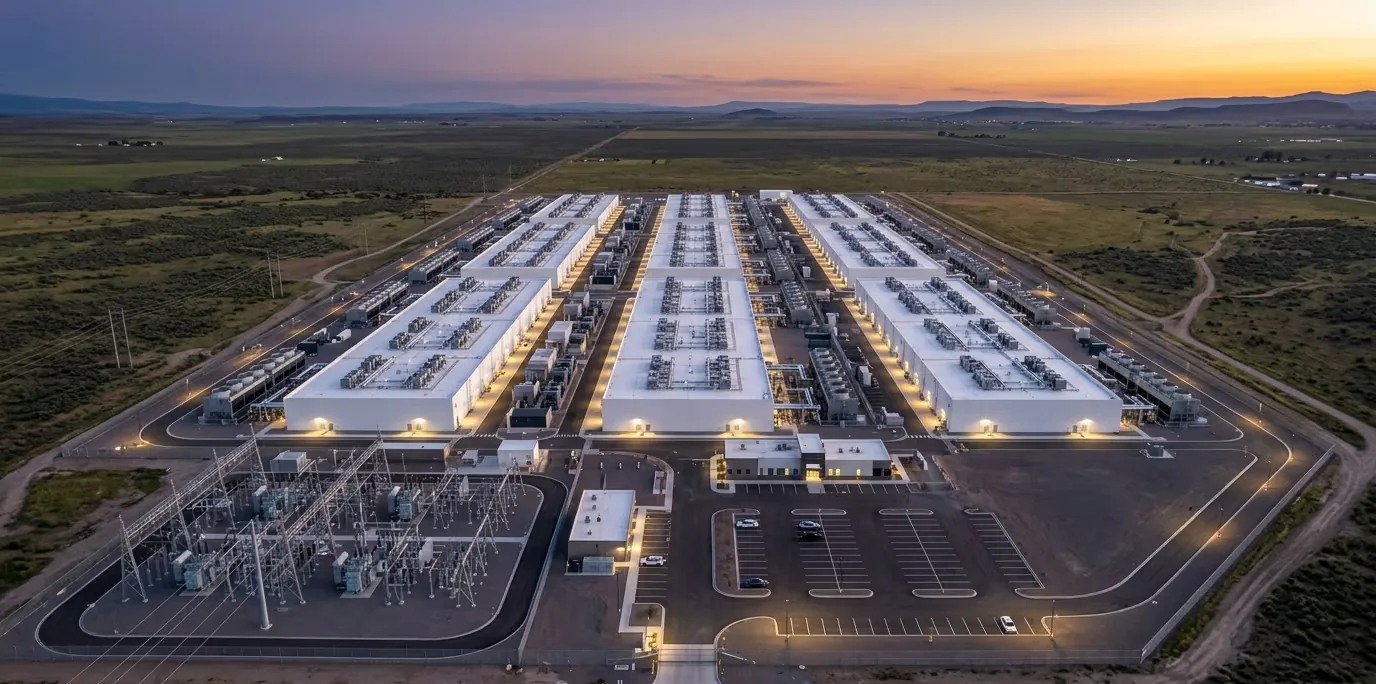
  <img src="/images/blog/commons-hero.webp" alt="Aerial view at dusk of a sprawling white hyperscale data center campus set on open plains, with an electrical substation in the foreground." loading="eager" style="width: 100%; height: auto;" />
  <figcaption>
    A hyperscale campus on the plains at dusk. The substation in the foreground is the tell: the draw on the grid arrives with the buildings.
  </figcaption>
</figure>

<p><em>A data center doesn’t ask permission from the water table. It just draws.</em></p>

<p>Garrett Hardin gave us the phrase everyone half-remembers from a college seminar: the tragedy of the commons. Shared resource, self-interested users, inevitable collapse. Nobody has to be evil. The math just works that way; each person captures the benefit of one more use, and the cost gets smeared across everyone else. Do that enough times and the pasture is dirt.</p>

<p>Swap the pasture for an aquifer. Swap the herders for hyperscale firms.</p>

<p>Same math. Faster clock.</p>

<p>A single data center pulls from the grid, the freshwater supply, the regional airshed (sometimes the aquifer underneath it, too). The developer gets the tax base, the (mostly temporary) jobs, the ribbon-cutting about “leading the AI economy.” The costs (grid stress, falling water tables, heat nobody asked for) land on ratepayers and neighbors who had no seat at the table. Northern Virginia’s interconnection queues are backed up for years. Central Arizona and the Ogallala Aquifer aren’t drifting toward trouble. They’re being run down on a five-year clock, not a fifty-year one.</p>

<p>So: tighten the rules. Add enforcement. Cap the draw. Case closed?</p>

<p>Not even close.</p>

<p>Hardin’s pasture had no rules at all; that was the whole premise. Data centers don’t site into a void. They land inside interconnection queues, prior-appropriation water law, zoning boards, environmental review. Thick institutional terrain, built over decades. The problem was never an absence of rules. It’s that the rules were sized for a different kind of user than the one that just showed up.</p>

<h2 id="ostroms-third-move">Ostrom’s Third Move</h2>

<p>This is where Elinor Ostrom is more useful than Hardin ever was.</p>

<p>Ostrom spent a career studying commons that didn’t collapse: irrigation systems, fisheries, groundwater basins managed by the people who actually depended on them, without privatizing the resource or handing it to a distant bureaucrat. She found the durable ones shared a few traits:</p>

<ul>
  <li><strong>Congruence</strong>: rules fit the actual resource and the actual people using it</li>
  <li><strong>Graduated sanctions</strong>: the penalty scales with the offense</li>
  <li><strong>Recognition</strong>: outside authorities respect a community’s right to govern itself</li>
</ul>

<p>Her real target wasn’t Hardin’s pessimism. It was his binary. Privatize it or let the state run it; those were supposedly the only two moves on the board. Ostrom found a third, and it worked, repeatedly, across very different resource systems.</p>

<p>But here’s the catch nobody built into that framework: it assumes the people drawing on the resource live with the consequences. Local users. Local accountability. Skin in the game.</p>

<p>Data center siting doesn’t work that way.</p>

<figure class="post-image" style="max-width: 900px; margin: 2rem auto;">
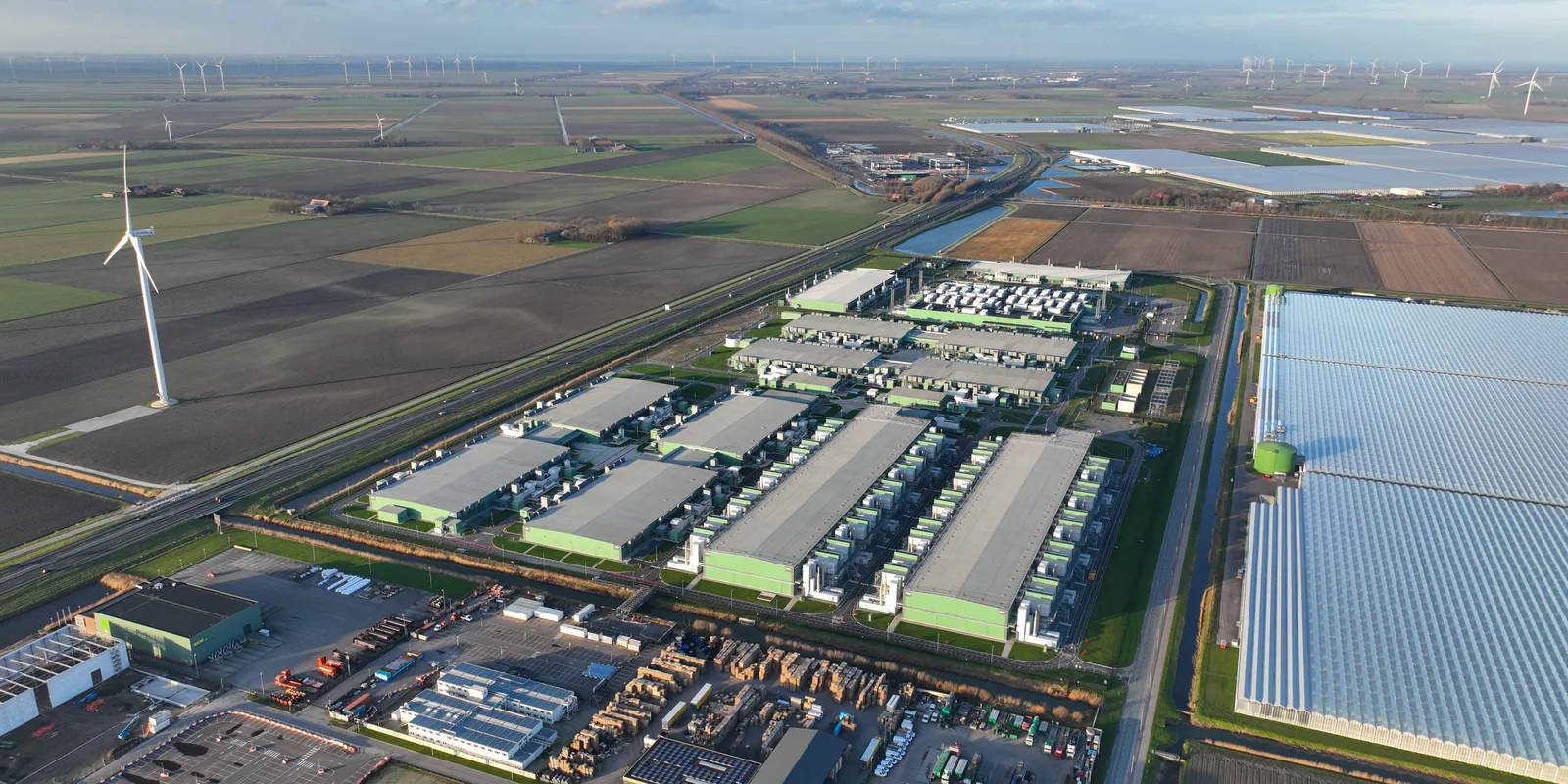
  <img src="/images/blog/commons-rural.webp" alt="Aerial view of a large data center complex wedged into rural farmland, flanked by wind turbines, drainage canals, and greenhouses." loading="lazy" style="width: 100%; height: auto;" />
  <figcaption>
    The facility lands in someone's watershed and airshed, next to the turbines, the canals, the greenhouses. The firm running it is somewhere else entirely.
  </figcaption>
</figure>

<p>The “community of appropriators” isn’t a village of farmers who share a well. It’s a handful of mobile, multinational firms running site-selection models across dozens of counties at once, hunting for wherever the guardrails are thinnest. Meanwhile the resource (the aquifer, the substation capacity, the airshed) is still stuck at the local scale, governed by institutions that were never built to face down capital this mobile.</p>

<p>Run that through Ostrom’s three conditions and watch each one buckle:</p>

<p>Congruence fails, because the rules were written for neighbors, not footloose capital that can walk to the next county over. Graduated sanctions fail, because one facility’s draw can blow past anything the rulebook ever imagined. Recognition fails, because the first casualty of a project deemed “big enough” is usually the local government’s actual say in the matter.</p>

<p>That’s the mismatch. Not a missing rulebook; a rulebook built at the wrong scale for the players who showed up to use it.</p>

<h2 id="a-stack-of-commons-not-one">A Stack of Commons, Not One</h2>

<p>And it’s not just water. Or just power.</p>

<p>Think of it as several commons stacked on top of each other: water, energy, land, air, tax base, even the basic legitimacy of local government to make its own calls. A single project can stress all of them simultaneously, and the way those layers interact isn’t something either Hardin or Ostrom built their models to handle; both were working one resource at a time.</p>

<p>Can overlapping, multi-scale governance (the polycentric arrangements Ostrom pointed toward late in her career) actually bridge a gap this wide?</p>

<p>That’s the open question.</p>]]></content><author><name>David P. Adams</name></author><category term="governance" /><category term="technology" /><category term="environment" /><summary type="html"><![CDATA[A hyperscale campus on the plains at dusk. The substation in the foreground is the tell: the draw on the grid arrives with the buildings.]]></summary></entry><entry><title type="html">My AI Assistant Hired a Bookkeeper (It’s a Mac Mini)</title><link href="https://dadams.io/2026/06/19/the-mac-mini-bookkeeper/" rel="alternate" type="text/html" title="My AI Assistant Hired a Bookkeeper (It’s a Mac Mini)" /><published>2026-06-19T00:00:00+00:00</published><updated>2026-06-19T00:00:00+00:00</updated><id>https://dadams.io/2026/06/19/the-mac-mini-bookkeeper</id><content type="html" xml:base="https://dadams.io/2026/06/19/the-mac-mini-bookkeeper/"><![CDATA[<p>I hit my Claude usage limit one afternoon and couldn’t figure out why. I hadn’t been working <em>that</em> hard. A few coding sessions, some writing, nothing that felt like it should have drained a daily allowance. So I did what I always do when a number doesn’t make sense: I went looking for the logs.</p>

<p>What I found is that my AI assistant had been keeping a very busy, very expensive bookkeeper on the payroll without telling me. This post is about how I fired that bookkeeper and handed the job to the most overqualified machine in my house: my ten-year-old’s Roblox computer.</p>

<h2 id="the-hidden-cost-of-a-good-memory">The Hidden Cost of a Good Memory</h2>

<p>I use <a href="https://github.com/thedotmack/claude-mem">claude-mem</a>, a memory layer for Claude Code. It’s genuinely great: it watches what I do across sessions, extracts little “observations” about decisions and bug fixes, and summarizes each session when it ends. The next time I open a project, it hands the assistant a tidy briefing of everything we figured out last time. No more re-explaining my setup every morning.</p>

<p>But that magic isn’t free. Every one of those observations is itself an LLM call. Every session summary is another. When I actually counted, the background bookkeeping was running somewhere around <strong>1,400 model calls a day</strong>—and all of them were billing against my Claude account, using the same quota I rely on for actual work.</p>

<p>That’s the trap with these convenience features: the foreground work is visible, but the background work is invisible until it shows up as a wall you’ve hit. My assistant was spending a meaningful chunk of my daily budget just taking notes about itself.</p>

<p>The thing is, this bookkeeping work doesn’t need a frontier model. Summarizing “we fixed the symlink config” or “the user prefers X” is a job a small, local model can do perfectly well. So why was I paying premium rates—and burning a finite quota—for it?</p>

<h2 id="enter-the-mac-mini">Enter the Mac Mini</h2>

<p>Here’s the punchline: the machine I had in mind belongs to my ten-year-old. It’s an M4 Mac mini, and as far as its owner is concerned its entire purpose in life is running Roblox and watching YouTube. But that little M4 is the same chip the whole local-LLM crowd has been raving about—a genuinely capable inference machine with fast unified memory, the kind of thing people are buying <em>specifically</em> to run models at home. Mine just happened to come pre-loaded with a Minecraft obsession.</p>

<p>It runs 24/7 anyway, and right now it’s summer, so its rightful owner is off doing whatever ten-year-olds do with their days—which leaves the machine even more idle than usual. A kid’s gaming rig and a model doing quiet background work turn out to be very compatible roommates; even when she <em>is</em> parked in front of it, a 7-billion-parameter model jotting notes barely registers next to Roblox. So the plan was simple:</p>

<ol>
  <li>Run <a href="https://ollama.com">Ollama</a> on the Mac mini to serve a small local model.</li>
  <li>Point all of claude-mem’s background work at the Mac mini instead of the Claude API.</li>
  <li>Reach it over <a href="https://tailscale.com">Tailscale</a>, so it works from anywhere without exposing anything to the open internet.</li>
</ol>

<p>Ollama exposes an OpenAI-compatible endpoint, which is the lingua franca these tools speak:</p>

<div class="language-bash highlighter-rouge"><div class="highlight"><pre class="highlight"><code><span class="c"># On the Mac mini</span>
brew <span class="nb">install </span>ollama
brew services start ollama
ollama pull qwen2.5:7b
</code></pre></div></div>

<p>That <code class="language-plaintext highlighter-rouge">qwen2.5:7b</code> model is the new bookkeeper. It’s small, it’s fast enough, and—this detail matters later—it only exists on my Mac mini. Nothing in the cloud serves that exact tag, which makes it a perfect fingerprint for verifying where my requests are actually going.</p>

<p>The Mac mini already runs with <code class="language-plaintext highlighter-rouge">pmset sleep=0</code> so it never naps on the job, and Tailscale gives it a stable address on my private network. Total ongoing cost: the electricity it was already using.</p>

<h2 id="the-catch-a-hardcoded-url">The Catch: A Hardcoded URL</h2>

<p>Here’s where it got interesting. I configured claude-mem to use its “OpenRouter” provider mode (OpenRouter being another OpenAI-compatible service), expecting to just override the base URL to my Mac mini.</p>

<p>There was no override. The endpoint was <strong>hardcoded</strong> in the worker source:</p>

<div class="language-javascript highlighter-rouge"><div class="highlight"><pre class="highlight"><code><span class="kd">const</span> <span class="nx">endpoint</span> <span class="o">=</span> <span class="dl">"</span><span class="s2">https://openrouter.ai/api/v1/chat/completions</span><span class="dl">"</span><span class="p">;</span>
</code></pre></div></div>

<p>No environment variable, no config key, no escape hatch. The tool assumed you’d only ever want to talk to OpenRouter’s servers.</p>

<p>When the polite door is locked, you use the window. I wrote a small patch script that rewrites that one constant to point at my Mac mini’s Tailscale address:</p>

<div class="language-bash highlighter-rouge"><div class="highlight"><pre class="highlight"><code><span class="c"># patch-ollama-endpoint.sh — redirect the hardcoded endpoint</span>
<span class="nb">sed</span> <span class="nt">-i</span> <span class="s1">''</span> <span class="se">\</span>
  <span class="s1">'s|https://openrouter.ai/api/v1/chat/completions|http://&lt;mac-mini-tailscale-ip&gt;:11434/v1/chat/completions|'</span> <span class="se">\</span>
  <span class="s2">"</span><span class="nv">$WORKER_SERVICE</span><span class="s2">"</span>
</code></pre></div></div>

<p>Then I set the provider config to feed it the right model and a dummy API key (Ollama ignores authentication anyway, which conveniently keeps my real keys off the wire entirely):</p>

<div class="language-plaintext highlighter-rouge"><div class="highlight"><pre class="highlight"><code>CLAUDE_MEM_PROVIDER=openrouter
CLAUDE_MEM_OPENROUTER_MODEL=qwen2.5:7b
CLAUDE_MEM_OPENROUTER_API_KEY=ollama      # dummy; Ollama doesn't check
CLAUDE_MEM_OPENROUTER_MAX_TOKENS=8192
CLAUDE_MEM_CONTEXT_OBSERVATIONS=20         # was 50; trims session-start preload
</code></pre></div></div>

<p>That last setting was a nice side benefit. Dialing the number of observations injected at session start from 50 down to 20 cut my startup context from roughly 21k tokens to about 8k. Less noise for the assistant, faster starts for me.</p>

<h2 id="making-it-survive-its-own-updates">Making It Survive Its Own Updates</h2>

<p>A patched source file has an obvious weakness: the next time the tool updates, my change gets wiped and the bookkeeper quietly goes back to billing my Claude account. I’d be right back where I started, except now I wouldn’t be looking for it.</p>

<p>The fix is to make the patch self-healing. Claude Code lets you run a hook every time a session starts, so I wired one up to re-apply the patch idempotently:</p>

<div class="language-json highlighter-rouge"><div class="highlight"><pre class="highlight"><code><span class="p">{</span><span class="w">
  </span><span class="nl">"hooks"</span><span class="p">:</span><span class="w"> </span><span class="p">{</span><span class="w">
    </span><span class="nl">"SessionStart"</span><span class="p">:</span><span class="w"> </span><span class="p">[</span><span class="w">
      </span><span class="p">{</span><span class="w"> </span><span class="nl">"command"</span><span class="p">:</span><span class="w"> </span><span class="s2">"~/.claude-mem/ensure-ollama-patch.sh"</span><span class="w"> </span><span class="p">}</span><span class="w">
    </span><span class="p">]</span><span class="w">
  </span><span class="p">}</span><span class="w">
</span><span class="p">}</span><span class="w">
</span></code></pre></div></div>

<p>The script checks whether the endpoint is already pointed at the Mac mini. If it is, it does nothing. If an update reverted it, the script re-patches and bounces the worker so the change takes effect. Either way, every session I start silently guarantees the bookkeeper is still working for free. No calendar reminders, no manual babysitting.</p>

<h2 id="trust-but-verify">Trust, but Verify</h2>

<p>Rerouting your own traffic and <em>assuming</em> it worked is how you end up surprised by another usage wall. I wanted proof. This is where that distinctive model name earns its keep:</p>

<div class="language-bash highlighter-rouge"><div class="highlight"><pre class="highlight"><code><span class="nb">grep</span> <span class="s1">'OpenRouter API usage'</span> ~/.claude-mem/logs/claude-mem-<span class="k">*</span>.log
</code></pre></div></div>

<div class="language-plaintext highlighter-rouge"><div class="highlight"><pre class="highlight"><code>OpenRouter API usage {model=qwen2.5:7b, inputTokens=3805,
  outputTokens=992, totalTokens=4797, estimatedCostUSD=0.0263}
</code></pre></div></div>

<p>Because <code class="language-plaintext highlighter-rouge">qwen2.5:7b</code> only lives on my Mac mini, every log line naming it is a request that <em>would have</em> hit my Claude quota and instead went to the Roblox machine for free. (The <code class="language-plaintext highlighter-rouge">estimatedCostUSD</code> figure is fiction—it’s the tool guessing at OpenRouter’s prices. My real cost is zero.)</p>

<p>I even have Claude Code keeping a periodic eye on the whole arrangement now: a lightweight health check that confirms the Mac mini is reachable, the worker is alive, and fresh <code class="language-plaintext highlighter-rouge">qwen2.5:7b</code> calls are still flowing—pinging me only if something breaks. The bookkeeper has a supervisor, and I don’t have to be it.</p>

<h2 id="a-war-story-free-of-charge">A War Story, Free of Charge</h2>

<p>No good infrastructure tale is complete without a yak-shave. The day I set this up, the Mac mini’s Ollama could list its models but refused to actually run any of them:</p>

<div class="language-plaintext highlighter-rouge"><div class="highlight"><pre class="highlight"><code>error starting llama-server: llama-server binary not found
</code></pre></div></div>

<p>The culprit was a half-finished Homebrew upgrade. The <code class="language-plaintext highlighter-rouge">ollama 0.30.3</code> bottle had shipped <em>incomplete</em>—the <code class="language-plaintext highlighter-rouge">llama-server</code> binary that does the real inference work simply wasn’t in the package. An interrupted <code class="language-plaintext highlighter-rouge">brew upgrade</code> had stranded me on the broken version.</p>

<div class="language-bash highlighter-rouge"><div class="highlight"><pre class="highlight"><code>brew upgrade ollama          <span class="c"># 0.30.3 -&gt; 0.30.10</span>
brew services restart ollama
</code></pre></div></div>

<p>The 0.30.10 bottle included the missing binary, and inference came right back. A good reminder that “it can list the models” and “it can run the models” are two very different claims.</p>

<h2 id="why-this-was-worth-doing">Why This Was Worth Doing</h2>

<p>I could have just paid for more quota. But this fits a pattern I keep coming back to, the same instinct behind <a href="/2026/03/11/whisper-for-accessibility/">running Whisper locally for captions</a> or <a href="/2025/08/23/taskwarrior/">living in Taskwarrior instead of a SaaS to-do app</a>: when a job can be done with hardware you already own, on data that never leaves your network, do it there.</p>

<p>The wins stack up nicely:</p>

<ul>
  <li><strong>Cost:</strong> ~1,400 daily calls moved from a metered account to free local compute.</li>
  <li><strong>Privacy:</strong> my project context and session summaries get processed at home, not shipped to a third party.</li>
  <li><strong>Resilience:</strong> a small local model handles the grunt work, freeing my Claude budget for the work that actually needs a frontier model.</li>
  <li><strong>No lock-in:</strong> the whole thing is a config file, a one-line patch, and a hook. Easy to understand, easy to undo.</li>
</ul>

<p>There’s a broader point here about these AI tools. They’re increasingly built on invisible background machinery—memory layers, summarizers, indexers—that quietly consume resources on your behalf. Convenient, until you’re the one paying for it without knowing. It’s worth occasionally asking <em>where is this work actually happening, and who’s footing the bill?</em></p>

<p>In my case, the answer used to be “my Claude account, constantly.” Now it’s “a ten-year-old’s Roblox machine, for free.” That’s a much better deal—and the bookkeeper hasn’t filed a single complaint. Neither, for the record, has the ten-year-old, who remains blissfully unaware that an M4-class language model is moonlighting on her Mac mini between rounds of <em>Blox Fruits</em>.</p>]]></content><author><name>David P. Adams</name></author><category term="self-hosting" /><category term="ai tooling" /><summary type="html"><![CDATA[I hit my Claude usage limit one afternoon and couldn’t figure out why. I hadn’t been working that hard. A few coding sessions, some writing, nothing that felt like it should have drained a daily allowance. So I did what I always do when a number doesn’t make sense: I went looking for the logs.]]></summary></entry><entry><title type="html">Whisper for Accessibility: A Practical Solution for April 2026 ADA Compliance</title><link href="https://dadams.io/2026/03/11/whisper-for-accessibility/" rel="alternate" type="text/html" title="Whisper for Accessibility: A Practical Solution for April 2026 ADA Compliance" /><published>2026-03-11T00:00:00+00:00</published><updated>2026-03-11T00:00:00+00:00</updated><id>https://dadams.io/2026/03/11/whisper-for-accessibility</id><content type="html" xml:base="https://dadams.io/2026/03/11/whisper-for-accessibility/"><![CDATA[<p>Everyone seems to be in a mild panic about the April 24, 2026 ADA Title II compliance deadline. Public universities need to ensure all digital content—including course videos—meets WCAG 2.1 Level AA accessibility standards. That means captions. Lots of captions. Better captions. Videos with sidecar files. Due yesterday.</p>

<p>The compliance machinery is real. Institutions serving 50,000+ people must comply by April 2026. Even with universities doing their best to provide support, the scope is still daunting: thousands of web pages to remediate, faculty training on accessible course materials, and vendor platform reviews for compliance.</p>

<p>Much of this work is landing on instructors mid-semester, with limited capacity and firm deadlines. It’s challenging (and stressful). I’m not using lecture videos this semester, but I am in the summer, which starts the moment the spring term ends. I can’t wait until the last minute.</p>

<p>I do what I do in cases like this, think about the command line, GitHub, and open-source tools. What can we do with the tools we already have to meet this challenge? The answer: OpenAI’s Whisper.</p>

<h2 id="whisper-not-just-for-meeting-notes">Whisper: Not Just for Meeting Notes</h2>

<p>I’ve been using OpenAI’s Whisper for a while now to record—primarily to transcribe recorded presentations and meetings into my Obsidian notes. Turns out it’s also excellent for generating <code class="language-plaintext highlighter-rouge">.srt</code> caption files for lecture recordings, and it’s the most practical answer I’ve found to a genuinely difficult ask. It’s easy to use, runs on consumer hardware, and produces high-quality captions that meet accessibility standards.</p>

<p>Whisper is a speech recognition model that runs locally on your computer. It converts audio to text with surprising accuracy, handles multiple languages, and outputs in various formats including the <code class="language-plaintext highlighter-rouge">.srt</code> (SubRip) format that video players and Canvas both understand.</p>

<h3 id="installation-and-basic-use">Installation and Basic Use</h3>

<p>Installation is straightforward:</p>

<div class="language-bash highlighter-rouge"><div class="highlight"><pre class="highlight"><code>pip <span class="nb">install </span>openai-whisper
</code></pre></div></div>

<p>For a single video file:</p>

<div class="language-bash highlighter-rouge"><div class="highlight"><pre class="highlight"><code>whisper lecture.mp4 <span class="nt">--model</span> medium <span class="nt">--output_format</span> srt <span class="nt">--language</span> en
</code></pre></div></div>

<p>This generates a timestamped <code class="language-plaintext highlighter-rouge">.srt</code> file alongside your video. Upload both to Canvas or YouTube, and you’ve got accessible video content.</p>

<h3 id="batch-processing-for-course-libraries">Batch Processing for Course Libraries</h3>

<p>If you’re like most faculty, you have a folder full of lecture recordings accumulated over semesters. Whisper handles batch processing:</p>

<div class="language-bash highlighter-rouge"><div class="highlight"><pre class="highlight"><code><span class="k">for </span>f <span class="k">in</span> <span class="k">*</span>.mp4<span class="p">;</span> <span class="k">do 
  </span>whisper <span class="s2">"</span><span class="nv">$f</span><span class="s2">"</span> <span class="nt">--model</span> medium <span class="nt">--output_format</span> srt <span class="nt">--language</span> en
<span class="k">done</span>
</code></pre></div></div>

<p>Drop this in a shell script, point it at your lecture directory, let it run overnight. Wake up to captioned videos.</p>

<figure class="post-image" style="max-width: 800px; margin: 1.5rem auto;">
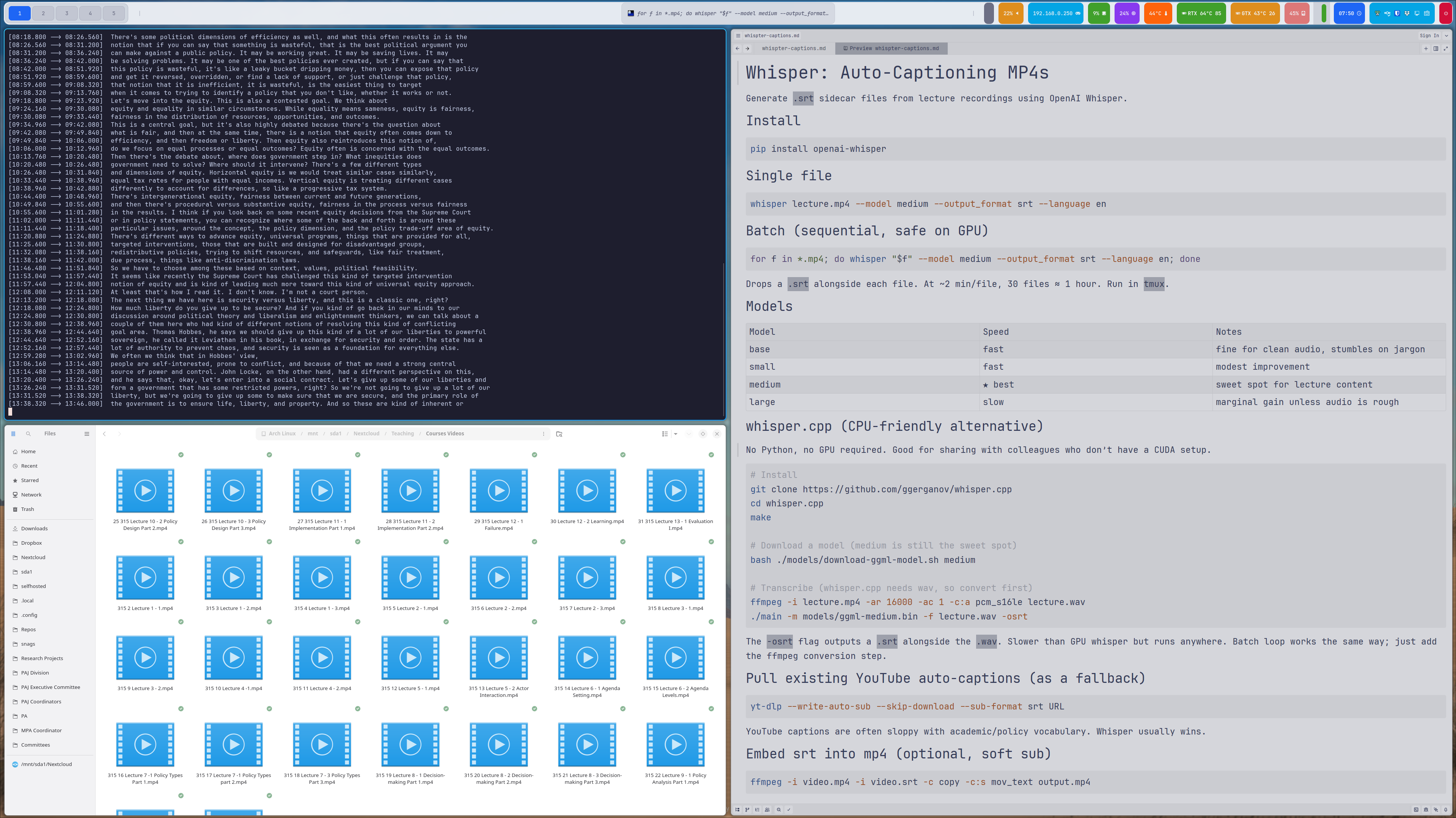
  <img src="/images/blog/whisper-in-action.png" alt="Terminal window showing Whisper batch-processing multiple lecture video files into .srt captions." loading="lazy" style="width: 100%; height: auto;" />
  <figcaption>
    Whisper batch processing in progress: multiple lecture recordings are being transcribed into caption files for accessibility compliance, alongside user notes.
  </figcaption>
</figure>

<h3 id="model-selection-and-performance">Model Selection and Performance</h3>

<p>Whisper offers several models with different speed/accuracy tradeoffs:</p>

<ul>
  <li><strong>base</strong>: Fast, reasonable for clean audio</li>
  <li><strong>small</strong>: Modest improvement, still quick</li>
  <li><strong>medium</strong>: Sweet spot for lecture content (what I typically use)</li>
  <li><strong>large</strong>: Best accuracy, slower, requires more GPU memory</li>
</ul>

<p>For typical lecture recordings—decent microphone, minimal background noise—the medium model performs admirably. Technical jargon occasionally trips it up, but the results are 90%+ accurate and easily corrected.</p>

<h3 id="the-cpu-vs-gpu-question">The CPU vs. GPU Question</h3>

<p>Whisper can run on CPU alone (no NVIDIA GPU required), making it genuinely accessible to anyone with a reasonably modern computer. GPU acceleration speeds things up considerably—a one-hour lecture might take 10-15 minutes on CPU, 2-3 minutes on GPU. But if you’re batch processing overnight, CPU-only works fine.</p>

<p>The <code class="language-plaintext highlighter-rouge">whisper.cpp</code> project offers an alternative implementation optimized for CPU performance. Worth exploring if you’re processing large video libraries without GPU access.</p>

<h3 id="youtube-captions-as-fallback">YouTube Captions as Fallback</h3>

<p>If your lecture video is already on YouTube, pulling its auto-generated captions can be a fast fallback for Canvas uploads. This is helpful when you need a quick first-pass <code class="language-plaintext highlighter-rouge">.srt</code>, don’t have time to reprocess everything locally, or want a draft you can quickly edit for accuracy.</p>

<div class="language-bash highlighter-rouge"><div class="highlight"><pre class="highlight"><code>yt-dlp <span class="nt">--write-auto-sub</span> <span class="nt">--skip-download</span> <span class="nt">--sub-format</span> srt URL
</code></pre></div></div>

<p>This grabs YouTube’s auto-generated captions without re-downloading the video. Not perfect, but sometimes faster than re-processing. Edit the resulting <code class="language-plaintext highlighter-rouge">.srt</code> file for accuracy before uploading to Canvas.</p>

<h3 id="embedding-captions-in-videos-optional">Embedding Captions in Videos (Optional)</h3>

<p>If you want captions permanently embedded in the video file itself (soft subtitles):</p>

<div class="language-bash highlighter-rouge"><div class="highlight"><pre class="highlight"><code>ffmpeg <span class="nt">-i</span> video.mp4 <span class="nt">-i</span> video.srt <span class="nt">-c</span> copy <span class="nt">-c</span>:s mov_text output.mp4
</code></pre></div></div>

<p>Canvas supports separate <code class="language-plaintext highlighter-rouge">.srt</code> files, so embedding captions is optional—but still useful when videos are shared outside Canvas or another LMS.</p>

<h3 id="why-this-matters-beyond-compliance">Why This Matters Beyond Compliance</h3>

<p>Many faculty are being asked to do a large amount of accessibility work with limited lead time and in the middle of an active term. That frustration is understandable.</p>

<p>Even so, captions deliver immediate value: they help students in noisy settings, multilingual learners, students who process information better with text, and anyone trying to review specific parts of a lecture quickly. Accessibility work is compliance-driven right now, but the instructional benefits are long-term.</p>

<h3 id="the-broader-accessibility-landscape">The Broader Accessibility Landscape</h3>

<p>Captions are only one part of the requirement. Version 2.1 of the Web Content Accessibility Guidelines (Level AA) also expects readable document structure, usable PDFs, meaningful alt text, keyboard-friendly navigation, and sufficient color contrast. Institutions also need repeatable workflows so accessibility is maintained as courses evolve, not treated as a one-time cleanup.</p>

<p>Because many universities have very small digital accessibility teams, much of this work lands on instructors. We’ve got a lot of personnel working on this, which is great, but there’s a lot of work to do. Practical tools like Whisper don’t solve everything, but they make one high-impact task—video captions—much more manageable under real-world time pressure.</p>

<h3 id="getting-started">Getting Started</h3>

<ol>
  <li>Install Whisper: <code class="language-plaintext highlighter-rouge">pip install openai-whisper</code></li>
  <li>Point it at a lecture video</li>
  <li>Upload the generated <code class="language-plaintext highlighter-rouge">.srt</code> file alongside your video in Canvas</li>
  <li>Repeat for your course library</li>
</ol>

<p>The April deadline is approaching. Whisper won’t solve every accessibility challenge, but it handles video captions efficiently—and runs on hardware you already own.</p>

<h3 id="resources">Resources</h3>

<ul>
  <li><a href="https://github.com/openai/whisper">Whisper GitHub Repository</a></li>
  <li><a href="https://github.com/ggerganov/whisper.cpp">whisper.cpp (CPU-optimized)</a></li>
  <li><a href="https://library.educause.edu/topics/it-professional-services/digital-and-web-accessibility">EDUCAUSE Digital Accessibility Resources</a></li>
  <li><a href="https://www.w3.org/WAI/WCAG21/quickref/">WCAG 2.1 Guidelines</a></li>
  <li><a href="https://www.ada.gov/resources/2024-03-08-web-rule/">DOJ ADA Title II Final Rule</a></li>
</ul>

<hr />

<p><em>For questions about institutional accessibility policies and support, contact your campus Digital Accessibility Office. For technical questions about Whisper implementation, the GitHub repository documentation is comprehensive.</em></p>]]></content><author><name>David P. Adams</name></author><category term="accessibility" /><category term="educational technology" /><summary type="html"><![CDATA[Everyone seems to be in a mild panic about the April 24, 2026 ADA Title II compliance deadline. Public universities need to ensure all digital content—including course videos—meets WCAG 2.1 Level AA accessibility standards. That means captions. Lots of captions. Better captions. Videos with sidecar files. Due yesterday.]]></summary></entry><entry><title type="html">Finally, A Task Manager That Doesn’t Suck</title><link href="https://dadams.io/2025/08/23/taskwarrior/" rel="alternate" type="text/html" title="Finally, A Task Manager That Doesn’t Suck" /><published>2025-08-23T00:00:00+00:00</published><updated>2025-08-23T00:00:00+00:00</updated><id>https://dadams.io/2025/08/23/taskwarrior</id><content type="html" xml:base="https://dadams.io/2025/08/23/taskwarrior/"><![CDATA[<p>I’ve tried them all. Todoist’s gamification felt juvenile after two weeks. Notion’s databases became more work than the actual work. Apple Reminders couldn’t handle the complexity of academic life. Things 3 was beautiful but rigid. Microsoft To-Do was just another bloated app but came pretty close to what I needed. And yet even bullet journals became another chore to maintain.</p>

<p>What finally worked wasn’t another shiny app with animated checkboxes. It was a 15-year-old command-line tool that treats task management like data management: flexible, filterable, and fast.</p>

<p>This post walks through how I set up Taskwarrior for academic life—research, teaching, service, and admin work—and why it’s the first task manager that’s actually stuck. If you live in the terminal and juggle multiple projects with shifting priorities, this might be exactly what you need.</p>

<h2 id="why-taskwarrior-works">Why Taskwarrior Works</h2>

<p><strong>It’s fast.</strong> Adding a task takes seconds: <code class="language-plaintext highlighter-rouge">task add "Grade midterms" project:classes +grading due:friday priority:H</code>. No clicking through dropdowns or waiting for sync.</p>

<p><strong>It’s flexible.</strong> Every task can have unlimited tags, custom attributes, and arbitrary metadata. Need to track which committee a task belongs to? Add <code class="language-plaintext highlighter-rouge">committee:hiring</code>. Want to estimate time? Add <code class="language-plaintext highlighter-rouge">estimate:2hr</code>. The data model bends to your workflow, not the reverse.</p>

<p><strong>It scales.</strong> I’m managing 200+ tasks across four major project areas. Taskwarrior handles this without breaking a sweat. Try that in a typical task app.</p>

<p><strong>It integrates.</strong> Tasks live in plain text files that sync with Syncthing. Reports pipe to other tools. Everything is scriptable, greppable, and backup-friendly.</p>

<h2 id="setting-up-for-academic-work">Setting Up for Academic Work</h2>

<h3 id="step-1-install-and-configure">Step 1: Install and Configure</h3>

<p>On Arch Linux:</p>
<div class="language-bash highlighter-rouge"><div class="highlight"><pre class="highlight"><code><span class="nb">sudo </span>pacman <span class="nt">-S</span> task
</code></pre></div></div>

<p>Or on most systems:</p>
<div class="language-bash highlighter-rouge"><div class="highlight"><pre class="highlight"><code><span class="c"># Check your package manager</span>
apt <span class="nb">install </span>taskwarrior    <span class="c"># Debian/Ubuntu</span>
brew <span class="nb">install </span>taskwarrior   <span class="c"># macOS</span>
</code></pre></div></div>

<p>Initial setup creates a basic <code class="language-plaintext highlighter-rouge">.taskrc</code>:</p>
<div class="language-bash highlighter-rouge"><div class="highlight"><pre class="highlight"><code>task
<span class="c"># Answer 'yes' to create sample config</span>
</code></pre></div></div>

<h3 id="step-2-enhanced-academic-configuration">Step 2: Enhanced Academic Configuration</h3>

<p>Replace the generated <code class="language-plaintext highlighter-rouge">.taskrc</code> with an academic-focused setup:</p>

<div class="language-bash highlighter-rouge"><div class="highlight"><pre class="highlight"><code><span class="c"># Color theme</span>
include dark-256.theme

<span class="c"># Default to 'next' report when you just type 'task'</span>
default.command<span class="o">=</span>next

<span class="c"># Enhanced next report with more academic context</span>
report.next.columns<span class="o">=</span><span class="nb">id</span>,start.age,depends,priority,project,tags,due.relative,description.count,urgency
report.next.labels<span class="o">=</span>ID,Active,Deps,P,Project,Tags,Due,Description,Urg

<span class="c"># Academic-specific reports</span>
report.research.description<span class="o">=</span>Research and academic tasks
report.research.filter<span class="o">=</span>project:research or +academic or +writing or +analysis

report.teaching.description<span class="o">=</span>All teaching-related tasks  
report.teaching.filter<span class="o">=</span>project:classes or project:teaching or +teaching or +grading

report.admin.description<span class="o">=</span>Administrative tasks
report.admin.filter<span class="o">=</span>project:admin or +admin or +meeting or +paperwork

report.service.description<span class="o">=</span>Service and committee work
report.service.filter<span class="o">=</span>project:service or +committee or +review or +editorial

<span class="c"># Weekly planning</span>
report.week.description<span class="o">=</span>This week<span class="s1">'s tasks
report.week.filter=due.before:sunday or due:today
report.week.sort=due+,priority-

# Urgency weighting for academic priorities
urgency.user.project.classes.coefficient=6.0    # Teaching has hard deadlines
urgency.user.tag.grading.coefficient=8.0        # Students are waiting
urgency.user.tag.deadline.coefficient=12.0      # Grant/conference deadlines
urgency.user.tag.conference.coefficient=7.0     # Conference deadlines are firm

# Time estimation
uda.estimate.type=string
uda.estimate.label=Est
uda.estimate.values=15min,30min,1hr,2hr,4hr,1day,1wk
</span></code></pre></div></div>

<h3 id="step-3-contexts-for-focus">Step 3: Contexts for Focus</h3>

<p>Contexts let you filter your entire task view to focus on one area:</p>

<div class="language-bash highlighter-rouge"><div class="highlight"><pre class="highlight"><code><span class="c"># Set up contexts in .taskrc</span>
context.research.read<span class="o">=</span>project:research or +academic or +writing
context.teaching.read<span class="o">=</span>project:classes or +teaching or +grading
context.admin.read<span class="o">=</span>project:admin or +meeting or +paperwork
</code></pre></div></div>

<p>Then switch focus modes:</p>
<div class="language-bash highlighter-rouge"><div class="highlight"><pre class="highlight"><code>task context research    <span class="c"># Only see research tasks</span>
task context teaching    <span class="c"># Only see teaching tasks  </span>
task context none        <span class="c"># Back to everything</span>
</code></pre></div></div>

<p>This is transformative. When I’m in “writing mode,” I only see writing tasks. When I’m prepping for class, only teaching tasks. No cognitive overhead from unrelated work.</p>

<h2 id="daily-workflow">Daily Workflow</h2>

<h3 id="morning-planning">Morning Planning</h3>
<div class="language-bash highlighter-rouge"><div class="highlight"><pre class="highlight"><code>task today        <span class="c"># What's due today</span>
task urgent       <span class="c"># Critical items</span>
task week         <span class="c"># Weekly overview</span>
</code></pre></div></div>

<h3 id="adding-tasks-throughout-the-day">Adding Tasks Throughout the Day</h3>
<div class="language-bash highlighter-rouge"><div class="highlight"><pre class="highlight"><code><span class="c"># Quick capture</span>
task add <span class="s2">"Email student about extension"</span> project:classes due:today

<span class="c"># With full context</span>
task add <span class="s2">"Revise methodology section"</span> project:research +writing priority:H due:friday estimate:4hr

<span class="c"># Service work</span>
task add <span class="s2">"Review manuscript for JPP"</span> project:service +review due:2024-09-01 estimate:8hr
</code></pre></div></div>

<h3 id="during-work-sessions">During Work Sessions</h3>
<div class="language-bash highlighter-rouge"><div class="highlight"><pre class="highlight"><code>task 15 start     <span class="c"># Start timer on task 15</span>
<span class="c"># Work on it...</span>
task 15 stop      <span class="c"># Pause timer</span>
<span class="c"># Later...</span>
task 15 start     <span class="c"># Resume</span>
task 15 <span class="k">done</span>      <span class="c"># Complete (shows total time)</span>
</code></pre></div></div>

<p>Time tracking is built-in and unobtrusive. Perfect for tenure files or grant reports where you need to document effort.</p>

<h3 id="end-of-day-review">End-of-Day Review</h3>
<div class="language-bash highlighter-rouge"><div class="highlight"><pre class="highlight"><code>task completed today    <span class="c"># What got done</span>
task next              <span class="c"># Plan tomorrow</span>
</code></pre></div></div>

<h2 id="academic-specific-patterns">Academic-Specific Patterns</h2>

<h3 id="research-project-management">Research Project Management</h3>
<div class="language-bash highlighter-rouge"><div class="highlight"><pre class="highlight"><code><span class="c"># Create task chains</span>
task add <span class="s2">"Collect survey data"</span> project:research-rtcc
task add <span class="s2">"Clean and code data"</span> project:research-rtcc depends:1
task add <span class="s2">"Run initial analysis"</span> project:research-rtcc depends:2
task add <span class="s2">"Write results section"</span> project:research-rtcc depends:3
</code></pre></div></div>

<h3 id="course-management">Course Management</h3>
<div class="language-bash highlighter-rouge"><div class="highlight"><pre class="highlight"><code><span class="c"># Recurring prep work</span>
task add <span class="s2">"Weekly lecture prep"</span> project:classes recur:weekly due:sunday

<span class="c"># Batch similar work</span>
task add <span class="s2">"Grade Discussion 1"</span> project:classes +grading course:POLS101
task add <span class="s2">"Grade Discussion 2"</span> project:classes +grading course:POLS101  
task add <span class="s2">"Grade Discussion 3"</span> project:classes +grading course:POLS101

<span class="c"># Then filter: task +grading list</span>
</code></pre></div></div>

<h3 id="service-work-tracking">Service Work Tracking</h3>
<div class="language-bash highlighter-rouge"><div class="highlight"><pre class="highlight"><code>task add <span class="s2">"Review tenure file"</span> project:service committee:personnel priority:H due:2024-08-30 estimate:6hr
task add <span class="s2">"Faculty meeting"</span> project:admin +meeting due:2024-08-22T14:00
</code></pre></div></div>

<h2 id="reports-that-actually-help">Reports That Actually Help</h2>

<p>Instead of meaningless productivity metrics, Taskwarrior gives you actionable views:</p>

<div class="language-bash highlighter-rouge"><div class="highlight"><pre class="highlight"><code>task research     <span class="c"># All research tasks</span>
task +grading     <span class="c"># All grading across courses  </span>
task +deadline    <span class="c"># Hard deadlines only</span>
task overdue      <span class="c"># What's late</span>
task waiting      <span class="c"># Tasks blocked by others</span>
</code></pre></div></div>

<p>The <code class="language-plaintext highlighter-rouge">burndown</code> report is particularly useful for conference deadlines or semester planning:</p>

<div class="language-bash highlighter-rouge"><div class="highlight"><pre class="highlight"><code>task burndown.weekly
</code></pre></div></div>

<p>Shows a visual graph of task completion over time. Great for understanding your actual work patterns versus planned deadlines.</p>

<h2 id="integration-with-p10koh-my-zsh">Integration with p10k/Oh My Zsh</h2>

<p>If you use Powerlevel10k, add this to your <code class="language-plaintext highlighter-rouge">.zshrc</code>:</p>

<div class="language-bash highlighter-rouge"><div class="highlight"><pre class="highlight"><code><span class="c"># Show task count in prompt</span>
<span class="nv">POWERLEVEL9K_CUSTOM_TASK</span><span class="o">=</span><span class="s2">"echo -n </span><span class="se">\$</span><span class="s2">(task +PENDING count) tasks"</span>
<span class="nv">POWERLEVEL9K_CUSTOM_TASK_FOREGROUND</span><span class="o">=</span><span class="s2">"yellow"</span>
POWERLEVEL9K_RIGHT_PROMPT_ELEMENTS+<span class="o">=</span>custom_task
</code></pre></div></div>

<p>Now your prompt constantly shows pending task count. It’s motivating without being annoying.</p>

<h2 id="syncing-across-devices">Syncing Across Devices</h2>

<h3 id="with-syncthing-recommended">With Syncthing (Recommended)</h3>
<div class="language-bash highlighter-rouge"><div class="highlight"><pre class="highlight"><code><span class="c"># Move task data to synced folder</span>
<span class="nb">mv</span> ~/.task ~/Syncthing/taskwarrior-data
<span class="c"># Update .taskrc</span>
data.location<span class="o">=</span>~/Syncthing/taskwarrior-data
</code></pre></div></div>

<p>Works perfectly. I add tasks on my laptop, and they appear on my desktop within minutes. No cloud services, no accounts, no privacy concerns.</p>

<h3 id="backup-strategy">Backup Strategy</h3>
<div class="language-bash highlighter-rouge"><div class="highlight"><pre class="highlight"><code><span class="c"># Daily export (add to crontab)</span>
task <span class="nb">export</span> <span class="o">&gt;</span> ~/Syncthing/task-backup-<span class="si">$(</span><span class="nb">date</span> +%Y%m%d<span class="si">)</span>.json
</code></pre></div></div>

<h2 id="why-this-beats-everything-else">Why This Beats Everything Else</h2>

<p><strong>Speed</strong>: No app loading, no web interfaces, no sync delays. Type <code class="language-plaintext highlighter-rouge">task add</code> and you’re capturing a thought in real-time.</p>

<p><strong>Flexibility</strong>: Academic work doesn’t fit neat categories. Taskwarrior adapts to however you think about your work.</p>

<p><strong>Longevity</strong>: Plain text files in an open format. Your tasks aren’t hostage to a startup’s business model.</p>

<p><strong>Power</strong>: Complex queries, bulk operations, and scriptability that no GUI app can match. Need all overdue tasks from last month? <code class="language-plaintext highlighter-rouge">task due.before:2024-07-01 status:pending list</code>. Done.</p>

<p><strong>No Lock-in</strong>: Don’t like Taskwarrior tomorrow? Export to JSON and import anywhere. Your data remains yours.</p>

<h2 id="the-academic-sweet-spot">The Academic Sweet Spot</h2>

<p>Most task managers are built for business workflows: projects with defined start/end dates, clear deliverables, and hierarchical structures. Academic work is messier. Research projects span years. Teaching prep recurs on weird schedules. Service work appears unpredictably.</p>

<p>Taskwarrior handles this beautifully because it doesn’t impose a workflow. It’s a flexible database for task data, with reporting tools that let you slice that data however makes sense for your actual work patterns.</p>

<p>After six months of daily use, I’m finally not thinking about my task management system. It just works, invisibly and efficiently. That’s the highest praise I can give any productivity tool.</p>

<h2 id="getting-started">Getting Started</h2>

<ol>
  <li>Install Taskwarrior: <code class="language-plaintext highlighter-rouge">brew install taskwarrior</code> or equivalent</li>
  <li>Copy the configuration above to <code class="language-plaintext highlighter-rouge">~/.taskrc</code></li>
  <li>Add your first task: <code class="language-plaintext highlighter-rouge">task add "Try Taskwarrior" priority:H due:today</code></li>
  <li>Run <code class="language-plaintext highlighter-rouge">task next</code> to see it</li>
</ol>

<p>Start simple. Add a few real tasks and use basic commands (<code class="language-plaintext highlighter-rouge">task list</code>, <code class="language-plaintext highlighter-rouge">task 1 done</code>) for a week. Then gradually add the academic-specific features as you see the value.</p>

<p>The best task manager is the one you actually use. For me, that’s finally Taskwarrior.</p>]]></content><author><name>David P. Adams</name></author><category term="productivity" /><category term="task management" /><summary type="html"><![CDATA[I’ve tried them all. Todoist’s gamification felt juvenile after two weeks. Notion’s databases became more work than the actual work. Apple Reminders couldn’t handle the complexity of academic life. Things 3 was beautiful but rigid. Microsoft To-Do was just another bloated app but came pretty close to what I needed. And yet even bullet journals became another chore to maintain.]]></summary></entry><entry><title type="html">A New Academic Year Begins</title><link href="https://dadams.io/2025/08/18/a-new-academic-year/" rel="alternate" type="text/html" title="A New Academic Year Begins" /><published>2025-08-18T00:00:00+00:00</published><updated>2025-08-18T00:00:00+00:00</updated><id>https://dadams.io/2025/08/18/a-new-academic-year</id><content type="html" xml:base="https://dadams.io/2025/08/18/a-new-academic-year/"><![CDATA[<p>It’s the Monday before classes start, and the semester is already creeping in. The groundskeepers were out early, trimming and sweeping, making the place look like it’s ready to host thousands again. The campus is still quiet, but it’s the kind of quiet that doesn’t last. You can feel it in the air—the held breath before movement.</p>

<p>I’ve been through this cycle a lot. This fall will be my 26th straight semester teaching public policy and public administration. I started back in 2012, teaching as a grad student, and I’ve been at it every fall and spring since, with a scattering of summers and winters along the way. You’d think the rhythm would get old, but it doesn’t. It still feels new every August.</p>

<p>At home the reset is happening too. My girls start school tomorrow. Their energy is its own barometer—excitement tangled up with nerves, that end-of-summer reluctance mixed with the thrill of something new. New backpacks, new routines, the bittersweetness of leaving behind long summer days. Their start overlaps with mine, and I like that. It makes the whole season feel bigger, more layered.</p>

<p>But this year also feels heavy. Some of my students are nervous about being on campus at all. The ICE raids and the attacks on immigrant communities here in Southern California have left a rawness that doesn’t just vanish once you step into a classroom. It shows up in the way students carry themselves, in what they say, and in what they don’t.</p>

<p>The question, too, is legal. Not just policy preferences or partisanship, but how the law itself is being wielded—who it protects, who it punishes. It cuts to the heart of the two social compacts we’re living in. One vision of governance is about legitimacy, trust, and a shared sense of belonging. The other is transactional and exclusionary, a politics of power as possession. In that vision, administration itself can become a weapon, narrowing the circle of who counts, criminalizing protest and protesters as though they were rebels instead of community members.</p>

<p>We’re living in both realities at once, and my students know it. Many of them embody it. That tension walks into the classroom with them, whether it’s named on the syllabus or not. And part of my work—maybe the most important part at the start of the semester—is to hold enough space for it. To make the room feel like a place where they belong, even when the world outside tells them otherwise.</p>

<p>This morning, between meetings, I got an email from a coauthor. When we first started working together, they were a PhD student, then ABD, finding their footing. Today’s email came signed with a new line at the bottom: “Assistant Professor.” A small change in a signature, but a reminder that these starts build into something larger. Students become colleagues. Ideas become books. The cycle is actually a trajectory.</p>

<p>So yes, I still love this time of year. The winds start to shift, the big-box stores fill with students buying lamps and ramen, the campus hums back to life. But what really matters is this: every new semester is another chance to decide which vision of governance we’re preparing for. Which compact we’re willing to teach, live, and defend. That’s the test.</p>]]></content><author><name>David P. Adams</name></author><category term="education" /><category term="public policy" /><summary type="html"><![CDATA[It’s the Monday before classes start, and the semester is already creeping in. The groundskeepers were out early, trimming and sweeping, making the place look like it’s ready to host thousands again. The campus is still quiet, but it’s the kind of quiet that doesn’t last. You can feel it in the air—the held breath before movement.]]></summary></entry><entry><title type="html">Friday Night Lights, Fading Fast</title><link href="https://dadams.io/2025/07/14/fiday-night-lights/" rel="alternate" type="text/html" title="Friday Night Lights, Fading Fast" /><published>2025-07-14T00:00:00+00:00</published><updated>2025-07-14T00:00:00+00:00</updated><id>https://dadams.io/2025/07/14/fiday-night-lights</id><content type="html" xml:base="https://dadams.io/2025/07/14/fiday-night-lights/"><![CDATA[<p><em>What happens when a government stops believing in the public?</em></p>

<p>High school football under the lights. Local kids, local legends, proud parents packed into the bleachers. It’s not just sport—it’s identity. It’s how the South shows up for itself. But those lights might be flickering out—for the grandmother watching from her living room, the crew at Waffle House, the uncle driving his rig across the state—not because the fans stopped coming, but because the institutions that hold us together are being dismantled.</p>

<p>Take a look at who’s behind the camera on game night. In Alabama, it’s public television. APT just wrapped its third season broadcasting the AHSAA Super 7 Championship games, streamed live and over the air, accessible to anyone with a signal. In Georgia, GPB airs Friday night matchups, playoff coverage, and hometown sports stories. These aren’t extras. They’re essentials. They make kids visible, connect communities, and document what matters.</p>

<p>And they’re under threat.</p>

<p>This week, Congress is set to vote on a $500 million cut to the Corporation for Public Broadcasting. It’s a targeted strike, pushed by Trump and backed by lawmakers who don’t want a public that can see, hear, or speak for itself. If it passes, local PBS and NPR stations—especially in rural states—lose their lifeline.</p>

<p>That means no more football broadcasts. No more high school championships. No more documentaries on state history or interviews with local leaders. Gone.</p>

<p>And let’s not pretend this is just about media. In the South, this is personal. This is SEC country. Football is a pipeline. It’s how kids get to college, land NIL deals, build futures. But that pipeline depends on visibility. Not every town has boosters. Not every kid has a recruitment team. A public broadcast is often the first time a name is called, the first time a kid realizes they might have a shot.</p>

<p>Cut the station, and you cut off that chance.</p>

<p>The people pushing this can’t produce a serious climate plan. They scoff at science, distrust teachers, and target journalists. What they fear is an informed, connected public. So they go after the systems that still believe in facts, learning, and civic life.</p>

<p>Ken Burns said public media is how America tells its story to itself. He wasn’t just talking about wars and presidents. He meant the places we never see in headlines—town halls, gymnasiums, state parks, public school auditoriums. The places where American life actually happens.</p>

<p>When those stations go dark, the stories disappear.</p>

<p>So yes, this is about football. But it’s also about whether kids from small towns get to be seen. Whether public education still includes culture and history. Whether community storytelling still has a place in a democracy.</p>

<p>The lights are still on. For now.</p>]]></content><author><name>David P. Adams</name></author><category term="public service" /><category term="democracy" /><category term="media" /><summary type="html"><![CDATA[What happens when a government stops believing in the public?]]></summary></entry><entry><title type="html">The Two Social Compacts</title><link href="https://dadams.io/2025/06/29/the-two-compacts/" rel="alternate" type="text/html" title="The Two Social Compacts" /><published>2025-06-29T00:00:00+00:00</published><updated>2025-06-29T00:00:00+00:00</updated><id>https://dadams.io/2025/06/29/the-two-compacts</id><content type="html" xml:base="https://dadams.io/2025/06/29/the-two-compacts/"><![CDATA[<p><em>Power, legitimacy, and the administrative state in a system the public misremembers—and one they never agreed to</em></p>

<p>Mark Blyth recently wrote that capitalism is rebooting its operating system. The ideas and institutions that once held the economy together no longer function as promised. What comes next is uncertain, but the shift is already happening.</p>

<p>The same is true of governance. Something fundamental has changed. But most people are pointing to the wrong culprit.</p>

<p>For decades, the American administrative state operated within a Lockean compact: limited government, lawful authority, delegated power, and institutional checks. Even as the state expanded during the New Deal and postwar period, its foundation remained grounded in the protection of rights and the consent of the governed. It wasn’t perfect, but it was legible. Principled. Built around restraint.</p>

<p>And yet, the modern public increasingly sees it as something else: bloated, intrusive, coercive. In the popular imagination, it’s Leviathan—faceless, unaccountable, and hostile to liberty. That perception has taken root over decades of political messaging, institutional drift, and cultural fragmentation.</p>

<p>But here’s the problem: <strong>the administrative state hasn’t abandoned the Lockean compact</strong>. It still operates—structurally and philosophically—within it. What’s changed is the political project now trying to seize control of that system.</p>

<p>What’s emerging is a new compact altogether. It centralizes authority under the executive, undermines neutral administration, and treats institutional independence as a threat. It promises to “take back control” but delivers loyalty tests, purges, and politicized enforcement. This isn’t a restoration of constitutional governance. It’s a rupture from it.</p>

<p>This new compact is not just post-liberal. It’s <strong>post-consensual</strong>. It no longer seeks legitimacy through elections, deliberation, or law. It asserts power through proximity, repetition, and the erosion of constraints. And it didn’t arise organically. It’s being engineered—deliberately, and with increasing speed.</p>

<p>So here’s the tension:</p>

<p>The public believes they’re still living under one compact.<br />
The administrative state, as designed, still operates under it.<br />
But another compact is being enforced, and the public was never asked to agree.</p>

<p>This isn’t a procedural crisis. It’s a philosophical one.<br />
A growing mismatch between the stories we tell about public authority and the systems that actually wield it.</p>

<p>We’re not running the old operating system anymore. The question is whether we’re ready to name what replaced it—and who’s still writing the code.</p>

<hr />

<h3 id="read-mark-blyths-piece"><a href="https://www.theatlantic.com/economy/archive/2025/06/reboot-capitalism-operating-system/683308">Read Mark Blyth’s piece</a></h3>]]></content><author><name>David P. Adams</name></author><category term="philosophy" /><category term="governance" /><summary type="html"><![CDATA[Power, legitimacy, and the administrative state in a system the public misremembers—and one they never agreed to]]></summary></entry><entry><title type="html">Keeping a Local, Searchable Journal with `jrnl`, Syncthing, and Obsidian</title><link href="https://dadams.io/2025/06/26/journaling/" rel="alternate" type="text/html" title="Keeping a Local, Searchable Journal with `jrnl`, Syncthing, and Obsidian" /><published>2025-06-26T00:00:00+00:00</published><updated>2025-06-26T00:00:00+00:00</updated><id>https://dadams.io/2025/06/26/journaling</id><content type="html" xml:base="https://dadams.io/2025/06/26/journaling/"><![CDATA[<p>I’ve bounced between a dozen journaling tools over the years:Day One, Standard Notes, Joplin, even bullet journals scrawled in Moleskines. Some were polished but locked down; others were open-source but clunky. Nothing really clicked.</p>

<p>Until now.</p>

<p>What finally worked wasn’t one perfect app. It was a simple, local-first system built around tools I already use: <code class="language-plaintext highlighter-rouge">jrnl</code>, Syncthing, Obsidian, and a few Zsh functions. It’s fast, frictionless, and entirely mine. No subscriptions. No vendor lock-in. No sync drama.</p>

<p>This post walks through how I set it up, how I use it daily, and why it’s finally stuck. If you want a journal that’s private, grep-friendly, and Markdown-native, this post is for you.</p>

<hr />

<h3 id="step-1-installing-jrnl">Step 1: Installing <code class="language-plaintext highlighter-rouge">jrnl</code></h3>

<p><a href="https://jrnl.sh"><code class="language-plaintext highlighter-rouge">jrnl</code></a> is a command-line journaling tool written in Python. It’s great for quick logging with natural syntax. Here’s how I got started on Arch:</p>

<div class="language-bash highlighter-rouge"><div class="highlight"><pre class="highlight"><code>pipx <span class="nb">install </span>jrnl
</code></pre></div></div>

<p>Or, for other systems:</p>

<div class="language-bash highlighter-rouge"><div class="highlight"><pre class="highlight"><code>pip <span class="nb">install</span> <span class="nt">--user</span> jrnl
</code></pre></div></div>

<p>Then configure it:</p>

<div class="language-bash highlighter-rouge"><div class="highlight"><pre class="highlight"><code>jrnl <span class="nt">--setup</span>
</code></pre></div></div>

<p>Set the default format to Markdown, and pick a journal file location like:</p>

<div class="language-bash highlighter-rouge"><div class="highlight"><pre class="highlight"><code>~/Syncthing/Journal/jrnl.md
</code></pre></div></div>

<p>This is where all your quick entries will go. You can also create a folder structure for daily and monthly logs, which I’ll show in a bit.</p>

<figure style="display: flex; flex-direction: column; align-items: center; margin: 2em 0;">
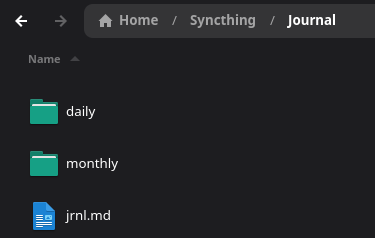
    <img src="/images/blog/20250626/folder_structure.png" alt="My Syncthing-backed journal folder. Daily and monthly logs in plain Markdown, plus jrnl.md for quick entries" style="max-width: 90vw; width: 100%; height: auto; border-radius: 8px; box-shadow: 0 2px 8px rgba(0,0,0,0.08);" />
    <figcaption style="margin-top: 0.75em; font-size: 1em; color: #555; text-align: center;">
        My Syncthing-backed journal folder. Daily and monthly logs in plain Markdown, plus <code>jrnl.md</code> for quick entries
    </figcaption>
</figure>

<p>(You could also break it up by day, but I mostly use <code class="language-plaintext highlighter-rouge">jrnl</code> for quick thoughts or scratch entries.)</p>

<hr />

<h3 id="step-2-sync-it-all-with-syncthing">Step 2: Sync It All with Syncthing</h3>

<p>I use <a href="https://syncthing.net/">Syncthing</a> to sync my <code class="language-plaintext highlighter-rouge">~/Syncthing/Journal</code> folder across devices: Linux desktop, laptop, and phone. This means my journal is always accessible, even offline. There’s no cloud service middleman. If I open Obsidian on my phone, I can browse and search my journal markdown instantly.</p>

<hr />

<h3 id="step-3-daily-and-monthly-markdown-files-with-zsh-helpers">Step 3: Daily and Monthly Markdown Files (with Zsh helpers)</h3>

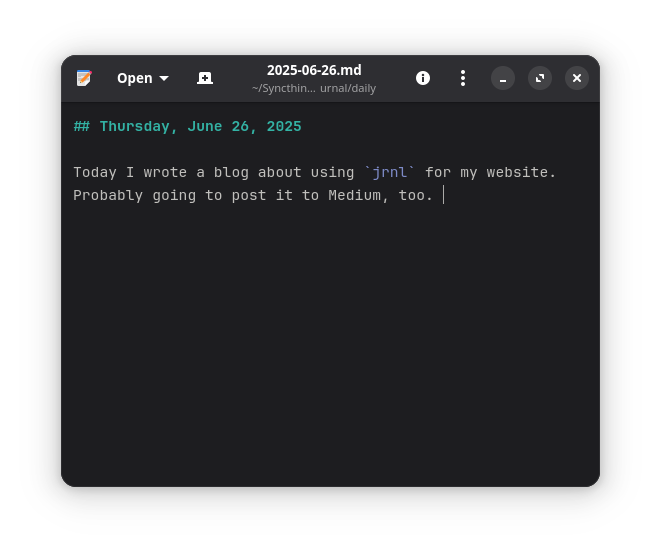
<p>For more structured entries—morning notes, logs, reflection—I use daily and monthly files in plain Markdown. I wired up a couple shell functions to make this frictionless:</p>

<div class="language-zsh highlighter-rouge"><div class="highlight"><pre class="highlight"><code><span class="c"># Add a line to today's daily file</span>
jday<span class="o">()</span> <span class="o">{</span>
  <span class="nb">local </span><span class="nv">file</span><span class="o">=</span>~/Syncthing/Journal/daily/<span class="si">$(</span><span class="nb">date</span> +%F<span class="si">)</span>.md
  <span class="nb">local </span><span class="nv">header</span><span class="o">=</span><span class="s2">"## </span><span class="si">$(</span><span class="nb">date</span> <span class="s1">'+%A, %B %d, %Y'</span><span class="si">)</span><span class="s2">"</span>
  <span class="nb">mkdir</span> <span class="nt">-p</span> <span class="s2">"</span><span class="si">$(</span><span class="nb">dirname</span> <span class="s2">"</span><span class="nv">$file</span><span class="s2">"</span><span class="si">)</span><span class="s2">"</span>
  <span class="k">if</span> <span class="o">[</span> <span class="o">!</span> <span class="nt">-f</span> <span class="s2">"</span><span class="nv">$file</span><span class="s2">"</span> <span class="o">]</span><span class="p">;</span> <span class="k">then
    </span><span class="nb">echo</span> <span class="nt">-e</span> <span class="s2">"</span><span class="nv">$header</span><span class="se">\n</span><span class="s2">"</span> <span class="o">&gt;&gt;</span> <span class="s2">"</span><span class="nv">$file</span><span class="s2">"</span>
  <span class="k">fi
  </span><span class="nb">echo</span> <span class="s2">"- </span><span class="si">$(</span><span class="nb">date</span> <span class="s1">'+%Y-%m-%d %H:%M'</span><span class="si">)</span><span class="s2"> :: </span><span class="nv">$*</span><span class="s2">"</span> <span class="o">&gt;&gt;</span> <span class="s2">"</span><span class="nv">$file</span><span class="s2">"</span>
<span class="o">}</span>

<span class="c"># Add a line to the current month's log</span>
jmonth<span class="o">()</span> <span class="o">{</span>
  <span class="nb">local </span><span class="nv">file</span><span class="o">=</span>~/Syncthing/Journal/monthly/<span class="si">$(</span><span class="nb">date</span> +%Y-%m<span class="si">)</span>.md
  <span class="nb">local </span><span class="nv">header</span><span class="o">=</span><span class="s2">"### </span><span class="si">$(</span><span class="nb">date</span> +%F<span class="si">)</span><span class="s2">"</span>
  <span class="nb">mkdir</span> <span class="nt">-p</span> <span class="s2">"</span><span class="si">$(</span><span class="nb">dirname</span> <span class="s2">"</span><span class="nv">$file</span><span class="s2">"</span><span class="si">)</span><span class="s2">"</span>
  <span class="k">if</span> <span class="o">!</span> <span class="nb">grep</span> <span class="nt">-q</span> <span class="s2">"</span><span class="nv">$header</span><span class="s2">"</span> <span class="s2">"</span><span class="nv">$file</span><span class="s2">"</span> 2&gt;/dev/null<span class="p">;</span> <span class="k">then
    </span><span class="nb">echo</span> <span class="nt">-e</span> <span class="s2">"</span><span class="se">\n</span><span class="nv">$header</span><span class="se">\n</span><span class="s2">"</span> <span class="o">&gt;&gt;</span> <span class="s2">"</span><span class="nv">$file</span><span class="s2">"</span>
  <span class="k">fi
  </span><span class="nb">echo</span> <span class="s2">"- </span><span class="si">$(</span><span class="nb">date</span> <span class="s1">'+%Y-%m-%d %H:%M'</span><span class="si">)</span><span class="s2"> :: </span><span class="nv">$*</span><span class="s2">"</span> <span class="o">&gt;&gt;</span> <span class="s2">"</span><span class="nv">$file</span><span class="s2">"</span>
<span class="o">}</span>
</code></pre></div></div>

<p>I keep these in my <code class="language-plaintext highlighter-rouge">~/.zshrc</code>. Now I can write:</p>

<div class="language-bash highlighter-rouge"><div class="highlight"><pre class="highlight"><code>jday Working on the RTCC survey protocol. Need to tighten up the logic model.
jmonth Had a good early AM workout. Hit squats, RDLs, and core.
</code></pre></div></div>

<p>You get nicely timestamped lines in clean, daily or monthly markdown logs. It’s great for personal tracking, future memos, or even paper breadcrumbs.</p>

<hr />

<h3 id="step-4-quick-edit-aliases">Step 4: Quick Edit Aliases</h3>

<p>Sometimes you want to open today’s entry in a GUI. I use GNOME, so I set up:</p>

<div class="language-zsh highlighter-rouge"><div class="highlight"><pre class="highlight"><code><span class="nb">alias </span><span class="nv">jedit</span><span class="o">=</span><span class="s1">'gnome-text-editor ~/Syncthing/Journal/daily/$(date +%F).md'</span>
<span class="nb">alias </span><span class="nv">medit</span><span class="o">=</span><span class="s1">'gnome-text-editor ~/Syncthing/Journal/monthly/$(date +%Y-%m).md'</span>
</code></pre></div></div>

<p>Swap <code class="language-plaintext highlighter-rouge">gnome-text-editor</code> with <code class="language-plaintext highlighter-rouge">code</code>, <code class="language-plaintext highlighter-rouge">nano</code>, or whatever suits you.</p>

<figure style="display: flex; flex-direction: column; align-items: center; margin: 2em 0;">
    <img src="/images/blog/20250626/jedit.png" alt="A sample daily journal" style="max-width: 90vw; width: 100%; height: auto; border-radius: 8px; box-shadow: 0 2px 8px rgba(0,0,0,0.08);" />
    <figcaption style="margin-top: 0.75em; font-size: 1em; color: #555; text-align: center;">
        A sample daily journal entry using `jedit` to open it in GNOME Text Editor.
    </figcaption>
</figure>

<hr />

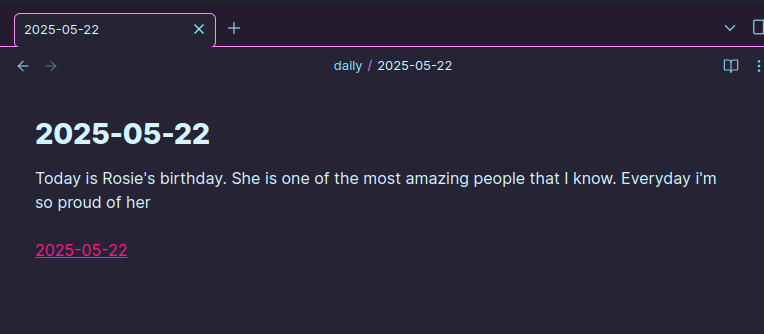
<h3 id="step-5-open-in-obsidian">Step 5: Open in Obsidian</h3>

<p>If you point Obsidian at your <code class="language-plaintext highlighter-rouge">~/Syncthing/Journal</code> folder, you get the full power of backlinks, graph view, tags, and search. I use this less for atomic notes and more for flipping through daily logs or tagging specific entries (e.g., <code class="language-plaintext highlighter-rouge">#project</code>, <code class="language-plaintext highlighter-rouge">#health</code>, <code class="language-plaintext highlighter-rouge">#teaching</code>).</p>

<p>Bonus: Obsidian Mobile works perfectly with this setup via Syncthing. No plugins needed.</p>

<figure style="display: flex; flex-direction: column; align-items: center; margin: 2em 0;">
    <img src="/images/blog/20250626/obsidian.png" alt="Obsidian gives me a clean interface to browse or search entries across time." style="max-width: 90vw; width: 100%; height: auto; border-radius: 8px; box-shadow: 0 2px 8px rgba(0,0,0,0.08);" />
    <figcaption style="margin-top: 0.75em; font-size: 1em; color: #555; text-align: center;">
        Obsidian gives me a clean interface to browse or search entries across time.
    </figcaption>
</figure>

<hr />

<h3 id="step-6-search-with-grep">Step 6: Search with <code class="language-plaintext highlighter-rouge">grep</code></h3>

<p>I can search my entire journal with a simple <code class="language-plaintext highlighter-rouge">grep</code> command:</p>

<div class="language-bash highlighter-rouge"><div class="highlight"><pre class="highlight"><code><span class="nb">grep</span> <span class="nt">-i</span> <span class="s1">'RTCC'</span> ~/Syncthing/Journal/daily/<span class="k">*</span>.md ~/Syncthing/Journal/monthly/<span class="k">*</span>.md
</code></pre></div></div>

<p>This gives me quick access to any entry mentioning “RTCC” across all my daily and monthly logs. It’s fast, efficient, and respects my privacy.</p>

<hr />

<h3 id="why-this-setup-works-for-me">Why This Setup Works for Me</h3>

<ul>
  <li><strong>Fast</strong>: I can log a thought in seconds without leaving the terminal.</li>
  <li><strong>Local-first</strong>: All Markdown, all synced peer-to-peer, no proprietary lock-in.</li>
  <li><strong>Flexible</strong>: <code class="language-plaintext highlighter-rouge">jrnl</code> for quick logs; structured markdown for deeper reflection.</li>
  <li><strong>Portable</strong>: Obsidian gives me a UI when I want it, CLI when I don’t.</li>
</ul>

<p>It’s not a silver bullet. But it’s fast, clean, and works the way I think. That’s enough to keep me writing.</p>

<hr />

<h3 id="conclusion">Conclusion</h3>

<p>This setup has transformed how I journal. It’s not just about writing; it’s about creating a system that fits my workflow, respects my privacy, and keeps me engaged. If you’re looking for a local, searchable journal that integrates seamlessly with your existing tools, give this a try.</p>]]></content><author><name>David P. Adams</name></author><category term="technology" /><category term="journaling" /><category term="productivity" /><summary type="html"><![CDATA[I’ve bounced between a dozen journaling tools over the years:Day One, Standard Notes, Joplin, even bullet journals scrawled in Moleskines. Some were polished but locked down; others were open-source but clunky. Nothing really clicked.]]></summary></entry><entry><title type="html">Command and Consent: What the National Guard Ruling Tells Us About Power</title><link href="https://dadams.io/2025/06/20/command-and-consent/" rel="alternate" type="text/html" title="Command and Consent: What the National Guard Ruling Tells Us About Power" /><published>2025-06-20T00:00:00+00:00</published><updated>2025-06-20T00:00:00+00:00</updated><id>https://dadams.io/2025/06/20/command-and-consent</id><content type="html" xml:base="https://dadams.io/2025/06/20/command-and-consent/"><![CDATA[<figure style="text-align: center;">
    <img src="/images/blog/alaguard.jpg" alt="Federal troops escorting Black students into a desegregated school in Montgomery, 1965" style="max-width: 100%; height: auto; display: block; margin: 0 auto;" />
    <figcaption style="margin-top: 0.5em; font-size: 0.95em; color: #555;">
        Image: Federalized National Guard in Alabama, 1965. Source: U.S. National Archives (Public Domain)
    </figcaption>
</figure>

<p>Still, the question lingers: <em>who commands the public servants when the public is divided?</em></p>

<p>Overnight, a federal appeals court let Donald Trump retain control over California’s National Guard—overriding the state’s elected leadership and setting up a high-stakes legal clash. Here’s a three-judge panel quietly blessing the idea that the president can federalize a state’s Guard even when the governor says no.</p>

<p>It’s not unprecedented. But it’s not normal either.</p>

<p>The last time a president federalized the Guard <em>against</em> a governor’s wishes was in 1965. Lyndon Johnson, confronting George Wallace’s refusal to desegregate Alabama schools, ordered federal troops to protect the rights of Black Americans. That was a confrontation over civil rights, the Constitution, and the brute power of the state. It was ugly, but the logic was clear: federal power was being used to enforce equal protection under law.</p>

<p>This time? The justification was a protest outside an ICE facility in Los Angeles. A few thrown objects. No lasting violence. The court said that was enough to invoke Title 10 authority. Enough to strip the governor of command. Enough, apparently, to tip the balance of federalism in favor of a president who has already shown contempt for democratic norms. It’s all performance. It’s all spectacle. And it’s all happening under the guise of “public safety.”</p>

<p>Let’s walk through what that means.</p>

<p>Under <strong>10 U.S.C. § 12406</strong>, the president can call up the National Guard during invasion, rebellion, or when states can’t enforce the law. Trump’s lawyers say the ICE protest met that bar. The appellate court didn’t rule definitively—they just issued a stay—but they found his case likely enough to halt a district court order returning control to Governor Newsom. In doing so, they leaned heavily on <em>Martin v. Mott</em> (1827), a centuries-old precedent that gives presidents broad discretion to decide what counts as an “emergency.”</p>

<p>But discretion isn’t the same as accountability. And this ruling has serious implications for the <strong>anti-commandeering doctrine</strong>—the principle that the federal government can’t force states to enforce federal law. It also chips away at the <strong>Posse Comitatus Act</strong>, which bars the use of military forces for domestic law enforcement without congressional approval. This isn’t about routine coordination. It’s about one executive, acting unilaterally, asserting control over forces that—at least in theory—exist to serve both the nation and the state.</p>

<p>And yes, it matters that Trump is the one asserting it.</p>

<p>Because this is the same man who, during his first term, asked advisors about seizing voting machines. Who floated martial law to “redo” the election. Who elevated performance over governance, grievance over law. So when he regains control of California’s National Guard, the question isn’t just whether he <em>can</em>. The question is what that power might be used for.</p>

<p>This isn’t a conspiracy. It’s a structural signal.</p>

<p>If the Supreme Court upholds this precedent—and they might—it opens the door for this and future presidents to claim emergency powers with minimal justification. That might not mean tanks in the streets. But it could mean Guard deployments during elections. Or rapid federalization of state resources in the name of “order.” Or chilling, strategic shows of force when local leaders refuse to comply. The tools are already in the toolbox. What’s shifting is the willingness to use them, and the courts’ growing deference to those choices. To allow the military to be used as a political tool, rather than a neutral arbiter of public safety.</p>

<figure style="text-align: center;">
    <img src="/images/blog/calguard.png" alt="National Guard troops deployed during civil unrest" style="max-width: 100%; height: auto; display: block; margin: 0 auto;" />
    <figcaption style="margin-top: 0.5em; font-size: 0.95em; color: #555;">
        Image: California National Guard during 2025 protests. Source: <a href="https://taskandpurpose.com/news/california-national-guard-general-fired-after-misusing-resources/" target="_blank" rel="noopener">Task &amp; Purpose</a>
    </figcaption>
</figure>

<p>This is where your theory class and your headlines start to blur.</p>

<p>We’re not just watching partisan conflict. We’re living through a fight between two social compacts, like I wrote about <a href="/2025/06/13/leaving-mexico/">here</a>. One compact—call it civic or constitutional—says that institutions exist to mediate conflict, not escalate it. That power flows from the people. That force is a last resort. The other compact—growing louder—is one of domination. It says the state exists to protect “us” from “them.” That consent is optional. That public servants serve the president, not the public.</p>

<p>That second compact thrives in the shadows. In the fine print. In the legal rulings that seem technical but redraw the map of who gets to decide.</p>

<p>So let’s bring this back to public service.</p>

<p>If you’re a city manager, a policy analyst, a National Guardsman, a planner, a teacher, this ruling isn’t abstract. It tells you who might give you your next order. It tells you what kind of power you might be asked to enforce. And it raises a deeper question: are we being equipped to serve democratic institutions, or repurposed to reinforce political control?</p>

<figure style="text-align: center;">
    <img src="/images/blog/constitution-tension.png" alt="U.S. Constitution layered over soldiers in riot gear" style="max-width: 100%; height: auto; display: block; margin: 0 auto;" />
    <figcaption style="margin-top: 0.5em; font-size: 0.95em; color: #555;">
        Image: Constitutional tension. Source: DALL·E (OpenAI)
    </figcaption>
</figure>

<p>There are still checks. Congress can step in. State legislatures can assert their authority. Courts can slow the slide. But none of those work without people inside the system who remember what it was built for. Who refuse to treat government as a stage for grievance. Who still believe that public service means something more than loyalty to the strongest voice in the room.</p>

<p>Keep teaching. Keep writing. Keep talking with your students, friends, kids about what this all means—not just legally, but morally. Because if we don’t hold tight to the older compact, the newer one will keep spreading.</p>

<p>And we’ll wake up one day realizing that the chain of command has changed—and no one asked us first.</p>]]></content><author><name>David P. Adams</name></author><category term="public service" /><category term="federalism" /><category term="democracy" /><summary type="html"><![CDATA[Image: Federalized National Guard in Alabama, 1965. Source: U.S. National Archives (Public Domain)]]></summary></entry><entry><title type="html">Tofu and Bok Choy: A Simple Meal</title><link href="https://dadams.io/2025/06/18/tofu-and-bokchoy/" rel="alternate" type="text/html" title="Tofu and Bok Choy: A Simple Meal" /><published>2025-06-18T21:00:00+00:00</published><updated>2025-06-18T21:00:00+00:00</updated><id>https://dadams.io/2025/06/18/tofu-and-bokchoy</id><content type="html" xml:base="https://dadams.io/2025/06/18/tofu-and-bokchoy/"><![CDATA[<p style="text-align: center;">
    <img src="/images/blog/tofu.WebP" alt="Tofu and Bok Choy" style="width: 75%; height: auto;" />
</p>

<p>I eat around 200 grams of protein a day. It’s not a moral stance—just a practical one. I lift early, I work a lot, and hitting that number makes everything a little easier.</p>

<p>That means a lot of meat. Chicken, ground beef, salmon when it’s on sale. But also tofu, which I actually like. Tofu and bok choy is probably the one thing I make regularly that doesn’t feel like I’m just assembling nutrients. It’s simple and it tastes good. That’s enough.</p>

<p>There’s no real recipe. Cube the tofu. Salt it. Brown it in oil. Toss in some garlic. Add bok choy. Soy sauce, maybe rice vinegar if I feel like pretending I measured anything. Steam it for a minute, stir it around, eat. Sometimes I add chili oil. Sometimes I don’t.</p>

<p>The kids love it too. I’ll cook some rice for them, maybe fry an egg on the side. They clean their plates and ask if there’s more.</p>]]></content><author><name>David P. Adams</name></author><category term="food" /><category term="vegetarian" /><summary type="html"><![CDATA[]]></summary></entry></feed>